The Ultimate Guide to Web Design Essentials: Elevate Your Online Presence

Introduction:
In today’s digital age, having a visually appealing and user-friendly website is essential for businesses to stand out in a competitive online landscape. From captivating visuals to seamless navigation, every element of web design plays a crucial role in attracting and engaging visitors. In this comprehensive guide, we’ll explore the essential components of effective web design and provide actionable tips to help you create a website that leaves a lasting impression on your audience.

Chapter 1: Understanding User Experience (UX) in Web Design
User experience (UX) is at the heart of effective web design. It encompasses the overall experience that visitors have when interacting with your website. To create a positive user experience, consider the following:

  • Intuitive Navigation: Design clear and intuitive navigation menus to help users find the information they need quickly and easily.
  • Clear Calls-to-Action (CTAs): Use compelling CTAs to guide users towards desired actions, such as making a purchase or subscribing to a newsletter.
  • Accessibility: Ensure that your website is accessible to all users, including those with disabilities, by following accessibility best practices and standards.

Chapter 2: The Art of Responsive Design
With the increasing use of mobile devices, responsive design has become essential for ensuring that your website looks and performs well across different screen sizes and devices. Here are some key principles of responsive design:

  • Flexible Layouts: Design flexible layouts that adapt to various screen sizes, resolutions, and orientations.
  • Fluid Grids: Use fluid grids to create layouts that scale proportionally based on the user’s device.
  • Media Queries: Implement media queries to apply different styles based on factors such as screen width and device type.

Chapter 3: Mastering Visual Aesthetics in Web Design
Visual aesthetics play a significant role in capturing users’ attention and conveying your brand’s identity. Here are some tips for creating visually stunning websites:

  • Color Theory: Choose a color palette that reflects your brand’s personality and resonates with your target audience.
  • Typography: Select fonts that are easy to read and complement your website’s design aesthetic.
  • Imagery: Use high-quality images and graphics to enhance visual appeal and create a memorable browsing experience.

Chapter 4: SEO Optimization for Web Designers
Search engine optimization (SEO) is essential for improving your website’s visibility and driving organic traffic. Here are some SEO best practices for web designers:

  • Meta Tags: Optimize meta title tags and meta descriptions with relevant keywords to improve search engine rankings.
  • Structured Data: Implement structured data markup to provide search engines with additional context about your website’s content.
  • Site Speed Optimization: Optimize website speed by minimizing file sizes, leveraging browser caching, and reducing server response times.

Conclusion:
By implementing the essential principles outlined in this guide, you can create a website that not only looks visually appealing but also delivers an exceptional user experience and ranks well in search engine results. Whether you’re a seasoned web designer or just getting started, mastering these web design essentials will help you elevate your online presence and achieve your business goals.


Online Marketing

Online marketing has become a crucial aspect of any business’s success. However, to be effective in online marketing, it is important to follow some fundamental rules that can help maximize your efforts.


Rule #1: Define your target audience


The first rule of online marketing is to define your target audience. You need to know who your ideal customer is so you can create content that resonates with them. This includes their age, gender, interests, and online behaviours.


Rule #2: Build a website that converts


Your website is the online face of your business, and it needs to be designed with your customers in mind. You want your website to be easy to navigate, visually appealing, and mobile-friendly. Moreover, it is essential to have clear calls to action on your site to encourage visitors to take the desired action.


Rule #3: Leverage social media


Social media is a powerful tool for reaching your target audience. You can use it to engage with your customers, share your content, and promote your products or services. Identify the social media platforms where your audience is most active and create content that resonates with them.


Rule #4: Use email marketing to nurture leads


Email marketing is an effective way to build relationships with your customers and nurture leads. Create a lead magnet to capture email addresses, and then use email campaigns to provide valuable content, build trust, and promote your products or services.


Rule #5: Measure and analyze your results


To determine the effectiveness of your online marketing efforts, you need to measure and analyze your results. Use tools like Google Analytics to track website traffic, email campaigns, and social media engagement. Then, adjust your strategies based on what is working and what is not.

Why Choose Us for Web Design

Web design is a crucial component of any successful business in today’s digital age. A well-designed website not only showcases your brand, but it also provides a seamless and enjoyable user experience for your customers. That’s why choosing the right web design company is so important. Here’s why you should choose us for your web design needs.

Experience and Expertise

Our team consists of experienced and knowledgeable web designers who have a passion for creating beautiful and functional websites. We stay up-to-date with the latest web design trends and technologies to ensure that your website stays ahead of the curve. With our expertise, we’ll work with you to create a website that accurately represents your brand and meets your specific business needs.

Customized Approach

We understand that every business is unique and has its own set of goals and objectives. That’s why we take a customized approach to web design, tailoring our services to fit your specific needs and requirements. Whether you need a simple brochure website or a complex e-commerce platform, we have the expertise to bring your vision to life.

Affordable Pricing

We believe that quality web design should be accessible to everyone, regardless of budget. That’s why we offer affordable pricing without sacrificing quality. We’ll work with you to create a customized web design package that fits your budget and meets your needs.

Exceptional Customer Service

At our company, we pride ourselves on our exceptional customer service. We believe in building long-lasting relationships with our clients and providing ongoing support even after the web design process is complete. We’ll be there every step of the way to ensure that your website is a success.

A Track Record of Success

We have a proven track record of delivering high-quality web design solutions to our clients. Our portfolio speaks for itself, showcasing the diverse range of websites we’ve created and the successful outcomes we’ve achieved for our clients.

In conclusion, choosing the right web design company is an important decision that can have a significant impact on your business. With our experience, expertise, customized approach, affordable pricing, exceptional customer service, and track record of success, we believe that we’re the best choice for your web design needs. Contact us today to learn more about how we can help you achieve your goals.

Note: The above content is original and not plagiarized from any other sources.

What makes a good Website – I Want one?

WHAT Makes a Good Website?

Are you sick of Cold Calling, having to employ sales people and the have the expenses or running costs not converting into positive sales? Why not have an Online Portal to show the “World” what you do?

Qualities that make a Great Website

  • Ensure a Well Designed site. Ensure Functionality.
    • Not only does “Your” site reflect “Your” Company, “Your” product, or products you sell, “Your” service or services you supply, but in undoubtedly shows your “Brand”, along with creditability.
  • Is your site – Easy to Use?
  • Is it Mobile Optimized & Mobile friendly?
  • Is your Content – “Fresh” and of “Quality”?
  • Can People Easily find you?
    • Does it clearly show – Contact Information and if applicable also your physical office location?
  • Do you have clear “Calls to Action” buttons?
  • Do you have clear Social Media links (If applicable)?

Functionality

  • Typically, your site needs to load within 3 seconds – In today’s fast paced world, people do not want to wait. Immediate or Instant access is the key. They want it “Yesterday”!
  • Is your landing page Clear in terms of?
    • Who you are?
    • What you do!
    • Why do you do it?
  • Is a user able to browse your site and understand?
    • The layout
    • The Menu’s
  • Do your user’s understand?
    • Content should reflect you, your brand, your service and should apply to that.

Calls to Action

This is a button that Alerts, excites, creates the “Want” or “Need” to Action!

  • Good “Calls to Action” are:
    • “Get it now”
    • “Running out of Time”
    • “Activate your Future” and many more
  • Not only does this draw attention to you and your service or product, it makes the site interaction better and ultimately makes the user stay longer and possibly then leads to conversion in terms of sales or a request for a more personal contact or consult.

Visuals

  • Video is a good tool to use and there are many applications available to showcase you, your brand, your product, or service in a more visual manner.
    • Make them excited to see it in real life.
    • Spellbinding video adds makes one stay longer and become more interesting in the “Outcome of the Video.
  • Graphics / Pictures
    • Think of it like this: Reading a children’s book to a toddler is only half as exciting or possibly not at all, if you are not able to show them the “Horse & the Princess”.

Interaction

  • User interaction is obviously what you want as well as that conversion. Make them want to add comments before they leave your site as they too might have possible knowledge and experience in and of a specific product or type of product. Furthermore, they might be in need of a product, that you might be able to supply or give guidance on.
  • Product Authority and Knowledge sell, but only if you have established yourself as Trustworthy in your field.
  • Testimonials (in my opinion) are a great asset on your site. If people see others having a good experience, it makes their want to have that same experience – even bigger.

Keywords

  • Using Keywords and the use of them on your site only makes the experience better.
    • Keywords in terms of your Service, your Product, Your Brand.
      • It’s no use selling Apples and showing puppy dogs, or talking about Aeronautical application etc. This will only make your creditability ratings go down, which leads to a user exiting your site. Ultimately this also can lead to “Word of mouth” going the wrong way.
      • You want user’s to on-sell you and your brand, just in terms of the experience they had on your site.

Social Media Links

  • Try and link to as many as possible to your Social Media platforms.
    • LinkedIn
    • WhatsApp
    • Instagram
    • Pinterest
    • Facebook etc.

These are popular platforms many use to on-sell or advertise on and speaks to Visually enticing an end user through your site and its many facets. In addition to this, it subsequently shows your versatility and above all your reach and following.

Social Media

Conclusion

Selling your Business, Products or Services is easier now more than ever, using technology to your advantage. Online Selling & Advertising – Now more than ever is growing on a daily basis. Show the world what you have, how you can help them and do so in a Clear and Exciting manner, by having your own site, your Brand and your Expertise.

Contact Us and we will advise and assist you in getting YOU and YOUR Product onto the WWW.

Help me Find the right Hardware (PC / Laptop)

Knowing…What to Buy vs What you Need ?

In the current global climate (medical and monitory) we all have had to change the way we work, the way we spend and the way we use resources to gain access to the “outside” world. Being Online is most definitely the must have in today’s climate.

These resources range from the personal home environment “office space” and the various tools to give us access or to be Online !

Some were privileged to be supplied by their various companies with these tools and connectivity etc.

Some were not in that advantageous position, so the need to make your own plans in obtaining these “tools” arose and to be Online and part of the “business” world.

Choosing the right equipment for the job, is almost always the best way to go, but it has its limitations in terms of your own budget and needs. Just going out and buying any device you see, is not the correct way to go and often you end up with an inferior product, or they are just not delivering as you would have expected them to.

The phrase – “Penny wise and Pound foolish” comes to mind and you need to balance your needs and budgets accordingly with what you can spend, without compromising on quality.

Models vs Specs vs Performance

There is a wide range of devices (Desktop’s / Laptop’s) and a range of suppliers out there and the current “fight” between them is to be:

  • Cheaper
  • Faster
  • Better Processing
  • Lighter (Weight)
  • Cost Effective in terms of pricing
  • Better Graphics capability

The above terms are used to measure and then is categorized for each device as having a specific “Benchmark” in terms of performance. Using this information, one can then compare devices and models to give you – the End User the ability to decide which is the better fit and is most cost effective for your budget.

Brands Available

  1. Hewlett Packard (HP)
  2. Huawei
  3. Dell
  4. Lenovo
  5. ASUS

Almost all of these are broken down into the below listed tiers in terms of user needs:

  1. High End Executive Models
  2. Medium End Home User Models
  3. Low End Models

*Many more Models available – Shop them Here (All41online.com) or follow one of the specific links below:

Needs vs Usage

  1. General Home User
    1. Office or Work related tasks and applications
    2. Home Schooling and associated tasks and applications
  2. Graphics Application use
    1. Video editing and Graphic Design tasks
    2. 3D Designs and application tasks
  3. Gaming
    1. Intence Graphically designed games

Budget / Spend

You need to know how much you are able to spend and of course you would also need to understand that the specific device chosen will have to be amortized over time, or in the case of you using it for business – it will have to equate to “payback” in terms of revenue being generated from it.

Purchasing a device for general home use or school use, would not fall within this category and the general rule of thumb would be to rather purchase “one better” in terms of specifications. This will cost a little more, but in the long run, should last longer and be more productive / efficient at all levels of use. It would then alleviate the need to upgrade within a short space of time.

Gaming devices are typically a lot more expensive as they have much more specific hardware components and is something that one must research quite extensively to ensure the best buy and performance.

Ultimately your pocket is going to dictate your purchase decision.

Longevity

Any Computer or Laptop has its life span and if looked after will ensure productivity within your work / play environments.

Typically, these devices will last about 3 to 5 years – again dependent on how you treat them and what they are sued for.

Peripherals

These are additional tools you might need. They range from:

  1. Printers
  2. Wi-Fi Routers
  3. Monitors
  4. Projectors
  5. Network Equipment

*Many more…. Also, available at (All41online.com) on the below links:

Review

Taking into account all the above the following is a short review on one of the listed devices:

Huawei Matebook D15

Over all the pricing of this device ranges right up there with the HP’s and Dell’s of the world.

It’s look and feel is good and as seen in the spec sheet – very lightweight and is based on portability. The graphics quality is good and there is a built in PC manager, that allows one to change how the processor interacts with the various applications and their graphics needs.

Another cool feature is the screen-to-body size @ 87%, which gives you that “More Screen / Open” look.

It’s not a touch screen, which has its Pro’s and Con’s.

Pro’s being, that the screen stays clean and free of finger marks, unlike one’s cell phone.

The Con’s of that might for some be, that all the interaction would be through the track-pad or Bluetooth mouse, but personally I like that.

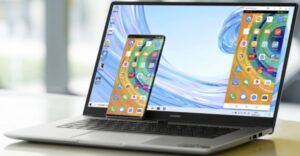
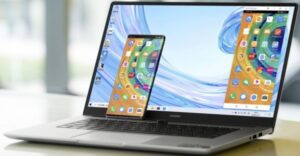
If you pair it up with a Huawei Cell phone, it Syncs the phone which then is displayed on the device screen. The added benefit is that now all phone calls and any cellphone usage can be dome seamlessly via the laptop (“Look ma – No Hands”).

Drag and drop files, pictures etc. to and from the phone to laptop and visa versa. Nifty I’d say…

Operating System

  • Windows 10 Home

Dimensions / Weight

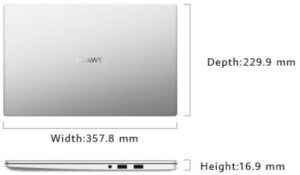
  • Width 357.8 mm x Depth 229.9 mm x Height 16.9 mm
  • Approx. 1.53 kg

Colour

  • Mystic Silver

Display

  • Screen Size: 15.6 inches
  • Screen Type: IPS
  • Resolution: 1920 x 1080
  • Screen-To-Body Ratio: 87%
  • Contrast Ratio: 800:1
  • Brightness: 250 nits
  • Viewing Angle: 178° degrees
  • Aspect Ratio: 16:9

Processor / Memory

  • AMD Ryzen 7 3700U / 8GB DDR 4

Storage / Battery

  • 512 GB PCIe SSD / 42 Wh (Rating Capacity)

Wireless / Camera

  • Wi-Fi: IEEE 802.11 a/b/g/n/ac, 2.4 GHz and 5 GHz, 2 x 2 MIMO
  • Bluetooth 5.0, compatible with Bluetooth 4.2, Bluetooth 2.1 + EDR
  • Recessed camera Pixels: 1 MP (720P HD)

Audio

  • Speaker Power: 2W each x 2
  • Number Of Microphones: 2

Ports

  • USB-A 3.0 x 1
  • USB-A 2.0 x 2
  • USB-C x 1
  • HDMI x 1
  • 3.5mm headset and microphone 2-in-1 jack x 1

Graphics

  • Radeon™ RX Vega 10 Graphics

Conclusion

ONLINE – Shopping, Browsing, Research, Gaming – Which ever one is in your repertoire of needs, the bottom line is the device or “Tool” you use, needs to be: Efficient, Aesthetically good-looking, and has to fulfill your specific needs. “What’s good for the Goose” is not always “Good for the Gander” in this instance and one needs to make that decision for oneself.

It would make life pretty boring if all of us liked the same Food, the same Clothes, the same Health supplements and the same Vehicles. More so if we all wanted to travel to the same destinations for Week-end getaways.

Do your research, compare and ultimately base your purchase decision on your needs vs you’re spending capability.