Help me Find the right Hardware (PC / Laptop)
Knowing…What to Buy vs What you Need ?
In the current global climate (medical and monitory) we all have had to change the way we work, the way we spend and the way we use resources to gain access to the “outside” world. Being Online is most definitely the must have in today’s climate.
These resources range from the personal home environment “office space” and the various tools to give us access or to be Online !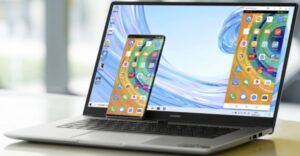
Some were privileged to be supplied by their various companies with these tools and connectivity etc.
Some were not in that advantageous position, so the need to make your own plans in obtaining these “tools” arose and to be Online and part of the “business” world.
Choosing the right equipment for the job, is almost always the best way to go, but it has its limitations in terms of your own budget and needs. Just going out and buying any device you see, is not the correct way to go and often you end up with an inferior product, or they are just not delivering as you would have expected them to.
The phrase – “Penny wise and Pound foolish” comes to mind and you need to balance your needs and budgets accordingly with what you can spend, without compromising on quality.

Models vs Specs vs Performance
There is a wide range of devices (Desktop’s / Laptop’s) and a range of suppliers out there and the current “fight” between them is to be:
- Cheaper
- Faster
- Better Processing
- Lighter (Weight)
- Cost Effective in terms of pricing
- Better Graphics capability
The above terms are used to measure and then is categorized for each device as having a specific “Benchmark” in terms of performance. Using this information, one can then compare devices and models to give you – the End User the ability to decide which is the better fit and is most cost effective for your budget.
Brands Available
- Hewlett Packard (HP)
- Huawei
- Dell
- Lenovo
- ASUS
Almost all of these are broken down into the below listed tiers in terms of user needs:
- High End Executive Models
- Medium End Home User Models
- Low End Models
*Many more Models available – Shop them Here (All41online.com) or follow one of the specific links below:
Needs vs Usage
- General Home User
- Office or Work related tasks and applications
- Home Schooling and associated tasks and applications
- Graphics Application use
- Video editing and Graphic Design tasks
- 3D Designs and application tasks
- Gaming
- Intence Graphically designed games
Budget / Spend
You need to know how much you are able to spend and of course you would also need to understand that the specific device chosen will have to be amortized over time, or in the case of you using it for business – it will have to equate to “payback” in terms of revenue being generated from it.
Purchasing a device for general home use or school use, would not fall within this category and the general rule of thumb would be to rather purchase “one better” in terms of specifications. This will cost a little more, but in the long run, should last longer and be more productive / efficient at all levels of use. It would then alleviate the need to upgrade within a short space of time.
Gaming devices are typically a lot more expensive as they have much more specific hardware components and is something that one must research quite extensively to ensure the best buy and performance.
Ultimately your pocket is going to dictate your purchase decision.
Longevity
Any Computer or Laptop has its life span and if looked after will ensure productivity within your work / play environments.
Typically, these devices will last about 3 to 5 years – again dependent on how you treat them and what they are sued for.
Peripherals
These are additional tools you might need. They range from:
- Printers
- Wi-Fi Routers
- Monitors
- Projectors
- Network Equipment
*Many more…. Also, available at (All41online.com) on the below links:
Review
Taking into account all the above the following is a short review on one of the listed devices:
Huawei Matebook D15
Over all the pricing of this device ranges right up there with the HP’s and Dell’s of the world.
It’s look and feel is good and as seen in the spec sheet – very lightweight and is based on portability. The graphics quality is good and there is a built in PC manager, that allows one to change how the processor interacts with the various applications and their graphics needs.
Another cool feature is the screen-to-body size @ 87%, which gives you that “More Screen / Open” look.
It’s not a touch screen, which has its Pro’s and Con’s.
Pro’s being, that the screen stays clean and free of finger marks, unlike one’s cell phone.
The Con’s of that might for some be, that all the interaction would be through the track-pad or Bluetooth mouse, but personally I like that.
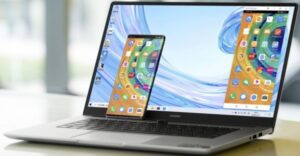
If you pair it up with a Huawei Cell phone, it Syncs the phone which then is displayed on the device screen. The added benefit is that now all phone calls and any cellphone usage can be dome seamlessly via the laptop (“Look ma – No Hands”).
Drag and drop files, pictures etc. to and from the phone to laptop and visa versa. Nifty I’d say…
Operating System
- Windows 10 Home
Dimensions / Weight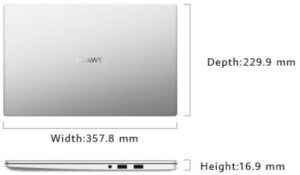
- Width 357.8 mm x Depth 229.9 mm x Height 16.9 mm
- Approx. 1.53 kg
Colour
- Mystic Silver
Display
- Screen Size: 15.6 inches
- Screen Type: IPS
- Resolution: 1920 x 1080
- Screen-To-Body Ratio: 87%
- Contrast Ratio: 800:1
- Brightness: 250 nits
- Viewing Angle: 178° degrees
- Aspect Ratio: 16:9
Processor / Memory
- AMD Ryzen 7 3700U / 8GB DDR 4
Storage / Battery
- 512 GB PCIe SSD / 42 Wh (Rating Capacity)
Wireless / Camera
- Wi-Fi: IEEE 802.11 a/b/g/n/ac, 2.4 GHz and 5 GHz, 2 x 2 MIMO
- Bluetooth 5.0, compatible with Bluetooth 4.2, Bluetooth 2.1 + EDR
- Recessed camera Pixels: 1 MP (720P HD)
Audio
- Speaker Power: 2W each x 2
- Number Of Microphones: 2
Ports
- USB-A 3.0 x 1
- USB-A 2.0 x 2
- USB-C x 1
- HDMI x 1
- 3.5mm headset and microphone 2-in-1 jack x 1
Graphics
- Radeon™ RX Vega 10 Graphics
Conclusion
ONLINE – Shopping, Browsing, Research, Gaming – Which ever one is in your repertoire of needs, the bottom line is the device or “Tool” you use, needs to be: Efficient, Aesthetically good-looking, and has to fulfill your specific needs. “What’s good for the Goose” is not always “Good for the Gander” in this instance and one needs to make that decision for oneself.
It would make life pretty boring if all of us liked the same Food, the same Clothes, the same Health supplements and the same Vehicles. More so if we all wanted to travel to the same destinations for Week-end getaways.
Do your research, compare and ultimately base your purchase decision on your needs vs you’re spending capability.


Helena Cloete
Thank you for this very informative information. Really well written and explained with great links.